
Calculator: Simple Calculator
Efficient ToolsTools
4.22.34K Reviews
- Version
- 1.3.8
- Installs
- 50.00M
- Age Rating
- Everyone
Screenshots
Our Review of Calculator: Simple Calculator
 Analysis by Appyee
I usually install a calculator because I need an answer quickly, not because I want to study a complicated tool. Calculator: Simple Calculator takes that everyday expectation and expands it around one useful idea: keeping several kinds of practical calculations close together instead of making me switch between separate apps or search for a web tool. After using it, I see it as a handy utility for people who regularly move between ordinary arithmetic, percentages, tips, loans, units, and currencies.
That wider approach is the reason this app stands out from the basic calculator already included on many phones. It is free, rated for Everyone, and developed by Efficient Tools. The app has reached over 50 million installs and holds a 4.2 average from around 123 thousand ratings, which suggests that its simple purpose is connecting with a broad everyday audience. My impression is that it succeeds best when I treat it as a pocket collection of small calculation tools rather than as a replacement for a professional financial or scientific calculator.
One calculator for decisions that normally need several tools
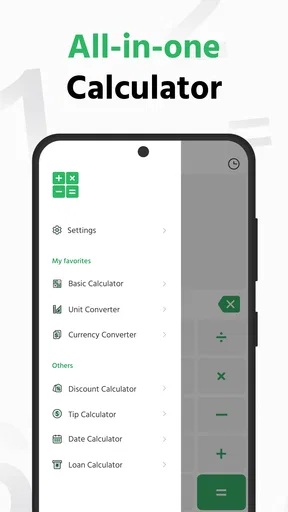
The most important capability here is the combination of calculation types. A standard calculator is fine for adding prices or checking a multiplication, but it becomes less convenient when the question changes from “what is the total?” to “what percentage is this?” or “how much should I leave as a tip?” Calculator: Simple Calculator is designed around those changes in context.
That matters because real calculations rarely arrive one at a time. While shopping, I might compare a percentage discount, divide a shared bill, and convert a measurement. When planning a payment, I may want a quick loan estimate after doing ordinary arithmetic. On a trip, currency and unit conversions can sit beside a normal calculation. Having these tasks grouped in one app reduces the small interruptions that come from opening different tools and remembering which one handles which question.
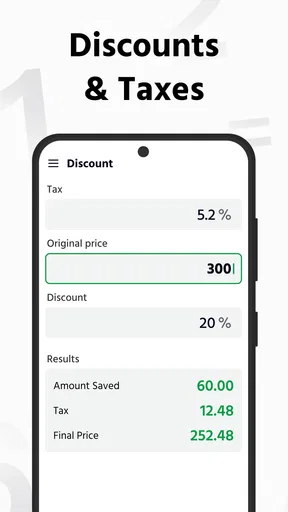
I particularly like this concept for people who do not think in mathematical formulas. A dedicated percentage or tip screen can make the task feel more approachable than entering a long expression into a plain keypad. The app’s store summary points to percentage, tip, loan, unit, and currency calculations, so its practical identity is clear: it is aimed at common decisions rather than advanced mathematics.
The real benefit is not a more powerful keypad; it is less switching between unrelated calculation methods. That distinction is important. If you only need addition and subtraction, the calculator built into your phone may be faster. The extra value appears when your question has a familiar everyday shape and deserves a tool designed for that shape.
Why the focused tools can be easier than raw arithmetic
With a normal calculator, calculating a tip means remembering the percentage, multiplying it by the bill, and adding the result if you want the final amount. That is manageable, but it creates opportunities for a misplaced decimal or a forgotten step. A tip-focused workflow makes the intention clearer. The same is true for percentages: entering the values according to what you are trying to find is generally easier than translating the question into a formula first.
This is also useful for learning. Someone who is uncomfortable with percentages can use the app to check an answer and then understand the relationship between the original amount and the result. I would not call it an educational mathematics platform, but its practical layouts can be less intimidating than a blank calculator screen.
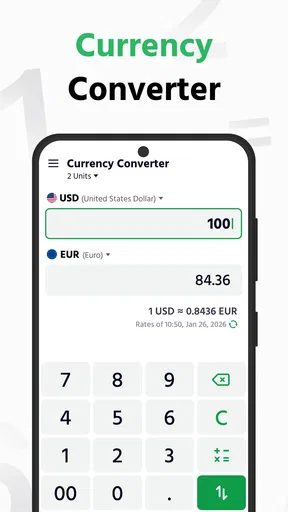
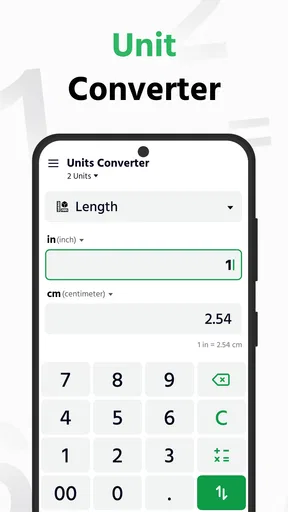
The unit and currency tools extend that convenience beyond money. A unit conversion is often needed while cooking, shopping for furniture, comparing product dimensions, or following instructions from another country. A currency calculation can help create a quick estimate while traveling or browsing an international price. In both cases, the app is most valuable when I need a fast approximation or a simple comparison rather than a detailed financial record.
How I use it in practice
The first thing I notice with an all-in-one calculator is that organization matters as much as arithmetic. I do not want to hunt through a crowded interface every time I move from a regular calculation to a percentage. The app’s purpose makes sense when each task feels like a separate, recognizable activity, with the ordinary calculator available for the moments when I simply need to enter numbers.
My practical workflow would start with the question, not the numbers. If I am splitting a restaurant bill, I first decide whether I need a percentage for the tip, a division for the number of people, or both. I then use the relevant calculation rather than trying to combine every step in one expression. This makes checking the result easier and lowers the chance of carrying a mistake from one stage into the next.
A useful habit is to keep intermediate answers visible in my notes when a decision involves multiple stages. For example, I might calculate a discount, then compare the reduced price with a converted currency value. The app can handle the individual calculations, but I still need to understand what each result represents. A calculator can prevent arithmetic errors; it cannot decide whether I entered the original price, discounted price, or tax-inclusive amount.
That is one of the app’s quiet strengths: it encourages me to separate everyday questions into manageable pieces. Instead of treating “how much will this cost?” as one vague problem, I can work through the percentage, conversion, and final total in a sensible order. This is more reliable than repeatedly tapping numbers into a basic calculator without labeling the purpose of each result.
A realistic bill-splitting example
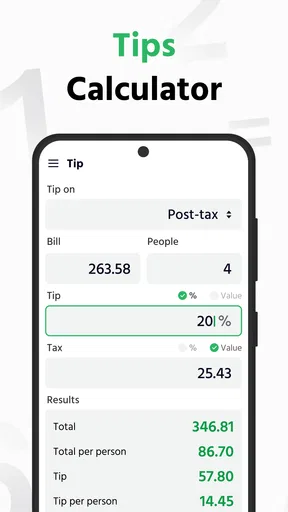
Imagine I am having dinner with friends. The bill is shared, a tip is expected, and one person has paid for an item that the others did not order. A basic calculator can technically solve the problem, but I would need to remember each formula and keep track of several values mentally. With this app, I can approach the task as separate everyday calculations: identify the tip amount, add it to the bill when appropriate, divide the shared portion, and then account for the individual item.
The important detail is not speed alone. It is the ability to check each stage. If the final amount looks wrong, I can inspect whether the issue came from the percentage, the division, or the personal adjustment. That is much more useful than receiving one final number with no clear sense of how it was produced.
I would still agree on the method with the group before relying on the result. Some people calculate a tip before splitting, while others split the bill first and tip according to each person’s share. The app can support either approach, but it cannot resolve that social choice. This is a good example of where a focused calculator helps with mechanics while leaving the decision to the user.
Conversions are helpful, but they need sensible checking
Unit conversion is another area where a combined tool can save time. I might use it when comparing centimeters with inches, checking a recipe, or deciding whether a piece of furniture will fit. The non-obvious advantage is that I can keep the conversion within the same utility I use for the related price or percentage calculation. That reduces the temptation to accept the first search result from a web page filled with unrelated information.
Currency conversion deserves a little more caution. A converted figure is useful for a quick estimate, but exchange values can change, and the amount charged by a bank, card provider, or merchant may differ from a simple conversion. I use the result as a planning number, not as a promise of the final transaction total. For a holiday budget, that is usually enough. For a large purchase or formal accounting, I would use a current rate from the relevant financial service and check every fee separately.
This distinction is one of the app’s practical boundaries. It can make a calculation convenient, but convenience should not be confused with financial authority. The same caution applies to loan calculations: a quick estimate can help me understand the broad effect of borrowing, while an actual lender’s terms may include conditions that a general calculator does not capture.
Loan calculations are best used as a screening step
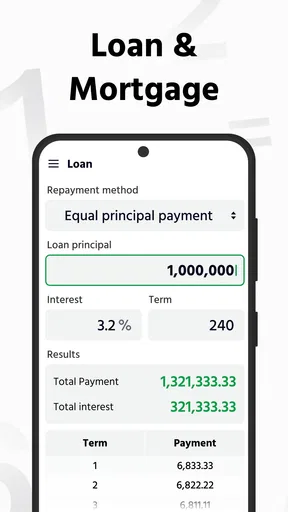
The loan tool is potentially valuable before I start comparing offers. It can help me ask sensible questions: what happens if the term is longer, how does the rate affect the payment, and what total cost should I expect from the figures I enter? Even when I am only exploring possibilities, this makes a vague borrowing decision more concrete.
I would use it to reject unrealistic options early, not to approve a loan. A calculator result depends on accurate inputs and on the assumptions built into the calculation. Fees, insurance, changing rates, payment schedules, and lender-specific rules can all affect the real cost. The right workflow is to use the app for an initial estimate, then compare the result with the official repayment schedule before making a commitment.
This is a meaningful trade-off. Including loan calculations makes the app more useful than a basic calculator, but it also creates a responsibility to interpret the result carefully. Someone who wants a full personal finance system, account tracking, or detailed amortization analysis may be better served by a dedicated finance app or a spreadsheet.
Where it fits better than the usual alternatives
The obvious alternative is the calculator already installed on an Android or iOS device. That built-in option is often the best choice for a quick sum because it is familiar and immediate. If I rarely calculate percentages, tips, conversions, or loan estimates, installing another tool may add little. Calculator: Simple Calculator earns its place when those tasks occur often enough that the extra functions save real time.
A web search is another alternative. Searching “tip calculator” or “unit converter” can produce an answer, but it usually involves advertisements, extra pages, and repeated typing. An app centered on these tasks is more direct for recurring use. It also keeps the workflow focused on entering values rather than interpreting a page of results.
Dedicated apps can still be better in specific situations. A serious traveler may prefer a currency app with richer rate information and travel-oriented planning. A student studying advanced mathematics may need scientific notation, graphing, equations, or symbolic work. A borrower comparing detailed financial products may need a specialized loan planner. I would not choose this calculator as a universal replacement for those tools.
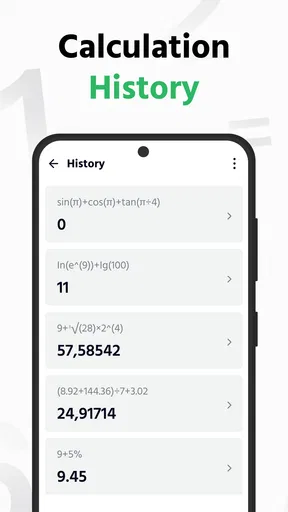
Compared with a spreadsheet, the app is quicker for a single decision and less demanding to set up. A spreadsheet wins when I need a history, repeatable formulas, categories, or a record that another person can inspect. Calculator: Simple Calculator is for the answer I need now, not for building a long-term model.
The trade-off between breadth and depth
The app’s broad set of everyday tools is convenient, but breadth always has a cost. A tool that covers ordinary arithmetic, tips, percentages, loans, units, and currencies may not go deeply into any one area. That is acceptable for quick personal use, but I would be cautious about treating it as a professional instrument.
There is also a mental trade-off. Having a dedicated option for each kind of calculation can reduce formula mistakes, yet it may encourage me to enter numbers without understanding the underlying operation. I get the best results when I use the app to verify my reasoning rather than surrendering the reasoning entirely. Before tapping calculate, I make sure I know what the input fields mean and whether the result should be a portion, a total, a rate, or a converted value.
Another limitation is that a calculator does not automatically know the context behind my numbers. A percentage may represent a discount, a tax, a growth rate, or a tip. The same numerical operation can answer different questions depending on the situation. I need to choose the correct workflow and interpret the output myself.
For that reason, I would not recommend it as the only tool for business bookkeeping, formal invoices, tax preparation, or lending decisions. It is much better as a fast companion for checking figures before I enter them into a more structured system.
Who gets the most value from it
I think the strongest audience is anyone who regularly handles small financial and measurement decisions but does not want a separate app for every one. Students can use it for quick percentage and unit checks. Families can use it while dividing expenses or planning a purchase. Travelers can use it for rough currency comparisons. Home cooks, shoppers, and renters can benefit from having conversions and ordinary arithmetic in the same place.
It is also a good fit for people who find a blank calculator screen easy to misuse. A focused calculation mode can make the intended operation clearer, especially when the question is phrased in everyday language rather than mathematical notation. That can be reassuring for users who want to double-check a result without building the formula from scratch.
I would recommend skipping it if your needs are extremely narrow or highly specialized. For one quick sum, the built-in calculator is probably enough. For advanced mathematics, detailed financial planning, or permanent records, a scientific calculator, finance app, or spreadsheet will be more appropriate. Installing an all-in-one utility only makes sense when its range of common tasks matches the way you actually work.
Device compatibility is also straightforward for many users: the app requires Android 8.0 or later. It is currently at version 1.3.8, and it remains free to use. Those details make it easy to consider as a low-commitment utility, particularly for someone who wants more than the default calculator without paying for a specialized service.
My recommendation after using it
Calculator: Simple Calculator is not exciting in the way a game or creative app can be, but its usefulness is easy to recognize. Efficient Tools has focused on a practical problem: everyday calculations are varied, and a single basic keypad does not always match the question I am trying to answer. The app’s value comes from bringing those familiar tasks into one place.
I would install it for quick percentage, tip, unit, currency, and loan estimates, while keeping my expectations realistic. It is a convenient calculation companion, not a financial adviser, accounting system, or advanced mathematics environment. If I check my inputs, understand what each result means, and use specialized tools when the stakes are high, it can remove a surprising amount of small daily friction.
With an average of 4.2 from around 123 thousand ratings and a large install base, it has clearly found an audience beyond people who only need simple addition. My own recommendation is similarly practical: choose it when variety matters more than specialist depth. For a free tools app rated for Everyone, that is a sensible and useful role, and it is the reason I would suggest it to a friend who keeps reaching for separate calculators throughout the day.
Verdict
Strengths of Calculator: Simple Calculator
- Clean, uncluttered interface that is easy to understand immediately.
- Large buttons make calculations comfortable on smaller phone screens.
- Starts quickly and uses very little storage or battery power.
- Useful for everyday arithmetic, shopping, budgeting, and quick estimates.
- Simple layout helps reduce distractions while entering numbers.
Limitations of Calculator: Simple Calculator
- Limited functionality for scientific, financial, or advanced calculations.
- May feel too basic for students and technical professionals.
- No visible history may make it harder to review previous results.
- Small display area can be inconvenient for long calculations.
- Features may vary between versions or devices.
Other Releases by Efficient Tools
View All
Video Player - AnyPlay
Video Players & Editors4.3

Bible Audio - KJV Daily Verse
Books & Reference4.9
Similar Picks in This Category
View All
Google LLC4.0

Gboard - the Google Keyboard
Google LLC4.5

Google Play services
Google LLC4.3

Google Play Store
Google LLC4.9

Files by Google
Google LLC4.5

SHAREit: Transfer, Share Files
Smart Media4U Technology Pte.Ltd.4.3
Frequently Asked Questions
What is Calculator: Simple Calculator used for?
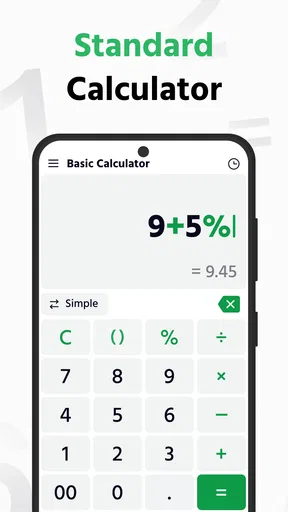
Calculator: Simple Calculator is designed for everyday arithmetic, including addition, subtraction, multiplication, division, percentages, and other basic calculations. Its straightforward layout makes it suitable for quickly checking prices, splitting bills, estimating expenses, or completing school and household calculations without unnecessary scientific or advanced tools getting in the way.
Is Calculator: Simple Calculator easy to use for beginners?
Yes. The app focuses on a clean, familiar calculator interface with clearly labeled buttons and an easy-to-follow display. Even users who are not comfortable with complicated technology should be able to start calculating immediately. The simple design is especially helpful when you need a quick result rather than a long list of advanced features or settings.
Does Calculator: Simple Calculator work without an internet connection?
For normal arithmetic, Calculator: Simple Calculator can generally be used offline because calculations are performed directly on the device. This is convenient when traveling, working in areas with poor reception, or trying to avoid unnecessary mobile data usage. Some optional features, advertisements, or store-related functions may still depend on the app version and device settings.
Is Calculator: Simple Calculator free to download?
The app may be available to download at no initial cost, but users should check its current Google Play Store or Apple App Store listing before installing. Depending on the version, it may include advertisements, optional purchases, or premium features. Reviewing the store description, permissions, and payment information is recommended so there are no surprises after downloading.
What should I check before using Calculator: Simple Calculator for important calculations?
Although the app is convenient for daily math, you should carefully review the numbers and operation symbols before relying on a result. Pay attention to decimal points, percentages, negative values, and the order in which operations are entered. For financial, academic, medical, or professional decisions, verify the answer with another trusted method when accuracy is especially important.
